Search found 1073 matches
- Fri Sep 25, 2026 7:15 pm
- Forum: Project Risk Analysis and Project Risk Management Theory
- Topic: Why are some task links red when I open my schedule?
- Replies: 1
- Views: 1298
Re: Why are some task links red when I open my schedule?
This is RiskyProject’s way of showing you scheduling conflicts that may affect your risk analysis results. Red links in RiskyProject indicate that there may be a problem with the logic between the linked tasks. For example, if you have a "Start No Earlier Than" constraint but your schedule...
- Fri Sep 25, 2026 7:10 pm
- Forum: Project Portfolio Risk Management
- Topic: Trial Versions for New Hires
- Replies: 1
- Views: 1261
Re: Trial Versions for New Hires
Yes. New hires can download the 30 day trial version directly from our website.
The trial has no feature limitations during the 30 day period.
The trial has no feature limitations during the 30 day period.
- Fri Sep 25, 2026 7:08 pm
- Forum: RiskyProject: Project risk management and risk analysis software
- Topic: Licensing Models: Subscription vs Perpetual vs Concurrent
- Replies: 1
- Views: 1356
Re: Licensing Models: Subscription vs Perpetual vs Concurrent
Here is our comparison between the two versions Subscription License • Annual fee as listed on our site • Includes standalone version + MSP Add in + maintenance/support for one year. • Includes upgrades and patches while subscription is active. • License is activated via a code/key and is machine lo...
- Fri Aug 21, 2026 1:02 pm
- Forum: Project Portfolio Risk Management
- Topic: Trial Versions for New Hires
- Replies: 1
- Views: 7100
Re: Trial Versions for New Hires
Yes. New hires can download the 30 day trial version directly from our website.
The trial has no feature limitations during the 30 day period.
The trial has no feature limitations during the 30 day period.
- Fri Aug 21, 2026 1:00 pm
- Forum: RiskyProject: Project risk management and risk analysis software
- Topic: Licensing Models: Subscription vs Perpetual vs Concurrent
- Replies: 1
- Views: 7121
Re: Licensing Models: Subscription vs Perpetual vs Concurrent
Here is our comparison between the two versions Subscription License Annual fee as listed on our site Includes standalone version + MSP Add in + maintenance/support for one year. Includes upgrades and patches while subscription is active. License is activated via a code/key and is machine locked. Li...
- Fri Aug 21, 2026 12:54 pm
- Forum: RiskyProject Project Risk Analysis Software Issues
- Topic: MSP Auto-Calculation Disabled When Running RiskyProject Add In
- Replies: 1
- Views: 8076
Re: MSP Auto-Calculation Disabled When Running RiskyProject Add In
Thanks for the detailed description. We tested this on our machines and did not see the same behavior, but it may be related to differences in MSP versions or environment configuration. Based on information available from Microsoft’s forums, MSP may automatically disable auto calculation when an add...
- Fri Jul 10, 2026 6:22 pm
- Forum: Project Portfolio Risk Management
- Topic: Minimum Requirements for Virtual Machines running RiskyProject.
- Replies: 2
- Views: 615425
Re: Minimum Requirements for Virtual Machines running RiskyProject.
Please note that RiskyProject uses multiple cores for Monte Carlo simulations. Than more core are available than faster calculations are. The optimal number of cores is 8 and up.
- Fri Jul 10, 2026 6:13 pm
- Forum: Project Risk Analysis and Project Risk Management Theory
- Topic: New calculation feature of RiskyProject 8
- Replies: 1
- Views: 198176
Re: New calculation feature of RiskyProject 8
Here is our article which describes the theory behind Bayesian analysis and Monte Carlo simulations:
https://intaver.com/blog-project-manage ... en-missing
https://intaver.com/blog-project-manage ... en-missing
- Wed Jun 10, 2026 4:48 am
- Forum: Project Portfolio Risk Management
- Topic: Project Server files not working with Addin
- Replies: 1
- Views: 49965
Re: Project Server files not working with Addin
When RiskyProject runs a simulation or exports an MSP file to the RiskyProject professional it creates a temp file *.xll, which is a subset of the MSP xml file. By default the temp file is saved in the folder in which the mpp file is saved. With Project Server, there isn't a file location to save th...
- Wed Jun 10, 2026 4:44 am
- Forum: RiskyProject: Project risk management and risk analysis software
- Topic: Running RiskyProject on Apple devices
- Replies: 1
- Views: 76073
Re: Running RiskyProject on Apple devices
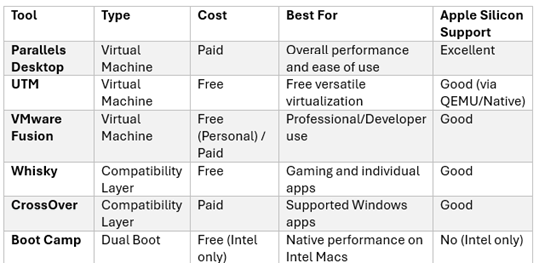
Mac users will need either a Windows partition or a Windows emulator to run the software. Here is a table of available VM or emulators.
- Tue Jun 09, 2026 8:54 pm
- Forum: RiskyProject Project Risk Analysis Software Issues
- Topic: Re: Virtual Machines for Mac User
- Replies: 0
- Views: 91378
Re: Virtual Machines for Mac User
These are the steps you will need to follow to enable virtual machines for Mac Users. You may want to check the UTM website or user forums to verify. Using UTM, Mac users can: • Install Windows (especially ARM on Apple Silicon) • Run many Windows applications • Avoid needing Boot Camp (which isn’t a...
- Thu May 14, 2026 9:30 am
- Forum: RiskyProject Project Risk Analysis Software Issues
- Topic: Unsure if low and high have been applied
- Replies: 1
- Views: 55680
Re: Unsure if low and high have been applied
To confirm if the uncertainty values have been applied, first apply the uncertaintioes using the dialog. 1. Select the task 2. Open the Set Low/High Duration dialog 3. Enter coefficients and choose a distribution 4. Click OK. https://www.intaver.com/images/RP_Forum_DurationCoeff.png The updated Low ...
- Thu May 14, 2026 9:21 am
- Forum: RiskyProject Project Risk Analysis Software Issues
- Topic: Task Simulation Results not opening
- Replies: 1
- Views: 35654
Re: Task Simulation Results not opening
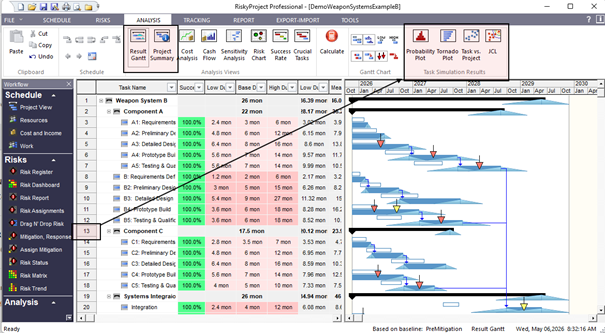
The icons only function when a task is selected. You must first highlight an activity by clicking on its ID, then click the simulation results icon.
- Thu May 14, 2026 9:18 am
- Forum: RiskyProject: Project risk management and risk analysis software
- Topic: Applying low and high estimates
- Replies: 1
- Views: 60363
Re: Applying low and high estimates
Yes. You can apply uncertainty to: Individual activities Groups of activities If applied to a summary task, the uncertainty will automatically apply to all subtasks beneath it. https://www.intaver.com/images/RP_Forum_LowHighDur.png Best Practices Use summary tasks for bulk adjustments when tasks sha...
- Thu May 14, 2026 9:11 am
- Forum: Project Risk Analysis and Project Risk Management Theory
- Topic: Methods for applying uncertainties
- Replies: 1
- Views: 121498
Re: Methods for applying uncertainties
Yes. Risky allows you to model uncertainty using: Uncertainty bands, Low/High Duration settings with statistical distributions, or Manually entering low and high durations and setting the statistical distribution using the Statistical Distribution for Duration field which can be added as a column to...