Project Server files not working with Addin
Moderator: Intaver Support
Project Server files not working with Addin
Our project schedules are stored online in a SharePoint folder. When I open a schedule directly from the SharePoint location, the file opens correctly in Microsoft Project. However, when I select the Risked Project button to export the file to RiskyProject, the process appears to start, but nothing happens.
risk manager
-
Intaver Support
- Posts: 1065
- Joined: Wed Nov 09, 2005 9:55 am
Re: Project Server files not working with Addin
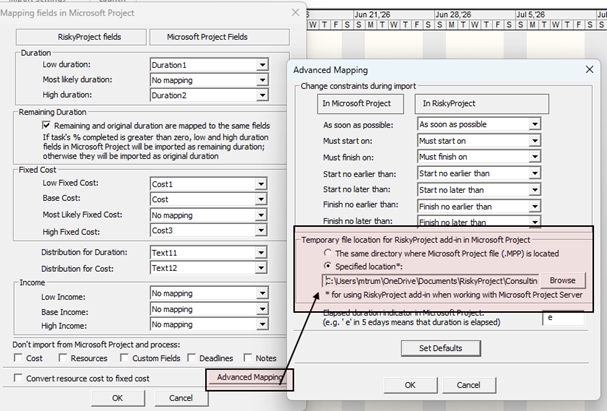
When RiskyProject runs a simulation or exports an MSP file to the RiskyProject professional it creates a temp file *.xll, which is a subset of the MSP xml file. By default the temp file is saved in the folder in which the mpp file is saved. With Project Server, there isn't a file location to save the temp file, so it needs to be set in the Advanced Mappings settings.
1. Open the RiskyProject desktop
2. Click Export/Import > Map MS Project Fields.
3. In the Mapping dialog, click Advanced Mapping.
4. Select the temporary file location for the RiskyProject Add-in in Microsoft Project. It must be one to which you have read and write permissions.
5. When you are saving the location, you need to provide a name for the temp file (e.g "temp")
1. Open the RiskyProject desktop
2. Click Export/Import > Map MS Project Fields.
3. In the Mapping dialog, click Advanced Mapping.
4. Select the temporary file location for the RiskyProject Add-in in Microsoft Project. It must be one to which you have read and write permissions.
5. When you are saving the location, you need to provide a name for the temp file (e.g "temp")
Intaver Support Team
Intaver Institute Inc.
Home of Project Risk Management and Project Risk Analysis software RiskyProject
www.intaver.com
Intaver Institute Inc.
Home of Project Risk Management and Project Risk Analysis software RiskyProject
www.intaver.com