Page 1 of 1
Project Server files not working with Addin
Posted: Wed Jun 10, 2026 4:46 am
by NTT
Our project schedules are stored online in a SharePoint folder. When I open a schedule directly from the SharePoint location, the file opens correctly in Microsoft Project. However, when I select the Risked Project button to export the file to RiskyProject, the process appears to start, but nothing happens.
Re: Project Server files not working with Addin
Posted: Wed Jun 10, 2026 4:48 am
by Intaver Support
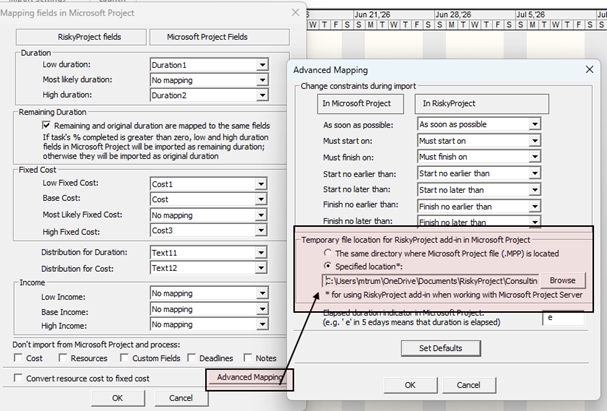
When RiskyProject runs a simulation or exports an MSP file to the RiskyProject professional it creates a temp file *.xll, which is a subset of the MSP xml file. By default the temp file is saved in the folder in which the mpp file is saved. With Project Server, there isn't a file location to save the temp file, so it needs to be set in the Advanced Mappings settings.
1. Open the RiskyProject desktop
2. Click Export/Import > Map MS Project Fields.
3. In the Mapping dialog, click Advanced Mapping.
4. Select the temporary file location for the RiskyProject Add-in in Microsoft Project. It must be one to which you have read and write permissions.
5. When you are saving the location, you need to provide a name for the temp file (e.g "temp")