Page 1 of 1
Unsure if low and high have been applied
Posted: Thu May 14, 2026 9:23 am
by Ken
How can I verify that uncertainty values have been applied to a task?
Re: Unsure if low and high have been applied
Posted: Thu May 14, 2026 9:30 am
by Intaver Support
To confirm if the uncertainty values have been applied, first apply the uncertaintioes using the dialog.
1. Select the task
2. Open the Set Low/High Duration dialog
3. Enter coefficients and choose a distribution
4. Click OK.
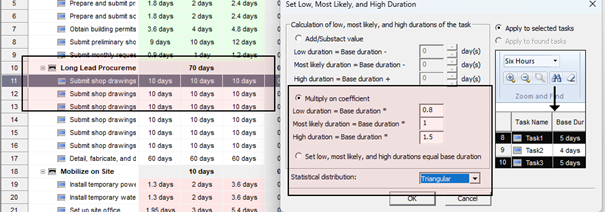
The updated Low and High durations will then appear in the task fields.
Best Practices
• Always validate inputs after applying distributions.
• Check that recalculated values align with expectations.
• Use consistent naming or tagging conventions to flag modified tasks.
• Keep a record of applied assumptions for traceability.