Unsure if low and high have been applied
Moderator: Intaver Support
Unsure if low and high have been applied
How can I verify that uncertainty values have been applied to a task?
Ken the PM
-
Intaver Support
- Posts: 1070
- Joined: Wed Nov 09, 2005 9:55 am
Re: Unsure if low and high have been applied
To confirm if the uncertainty values have been applied, first apply the uncertaintioes using the dialog.
1. Select the task
2. Open the Set Low/High Duration dialog
3. Enter coefficients and choose a distribution
4. Click OK.
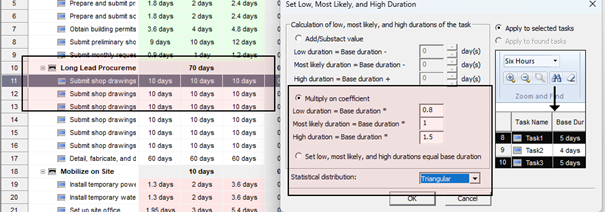
The updated Low and High durations will then appear in the task fields.
Best Practices
• Always validate inputs after applying distributions.
• Check that recalculated values align with expectations.
• Use consistent naming or tagging conventions to flag modified tasks.
• Keep a record of applied assumptions for traceability.
1. Select the task
2. Open the Set Low/High Duration dialog
3. Enter coefficients and choose a distribution
4. Click OK.
The updated Low and High durations will then appear in the task fields.
Best Practices
• Always validate inputs after applying distributions.
• Check that recalculated values align with expectations.
• Use consistent naming or tagging conventions to flag modified tasks.
• Keep a record of applied assumptions for traceability.
Intaver Support Team
Intaver Institute Inc.
Home of Project Risk Management and Project Risk Analysis software RiskyProject
www.intaver.com
Intaver Institute Inc.
Home of Project Risk Management and Project Risk Analysis software RiskyProject
www.intaver.com