

RiskyProject Project Risk Management and Risk Analysis Software Suite
Contact Intaver Institute to learn more about this and other features of RiskyProject.
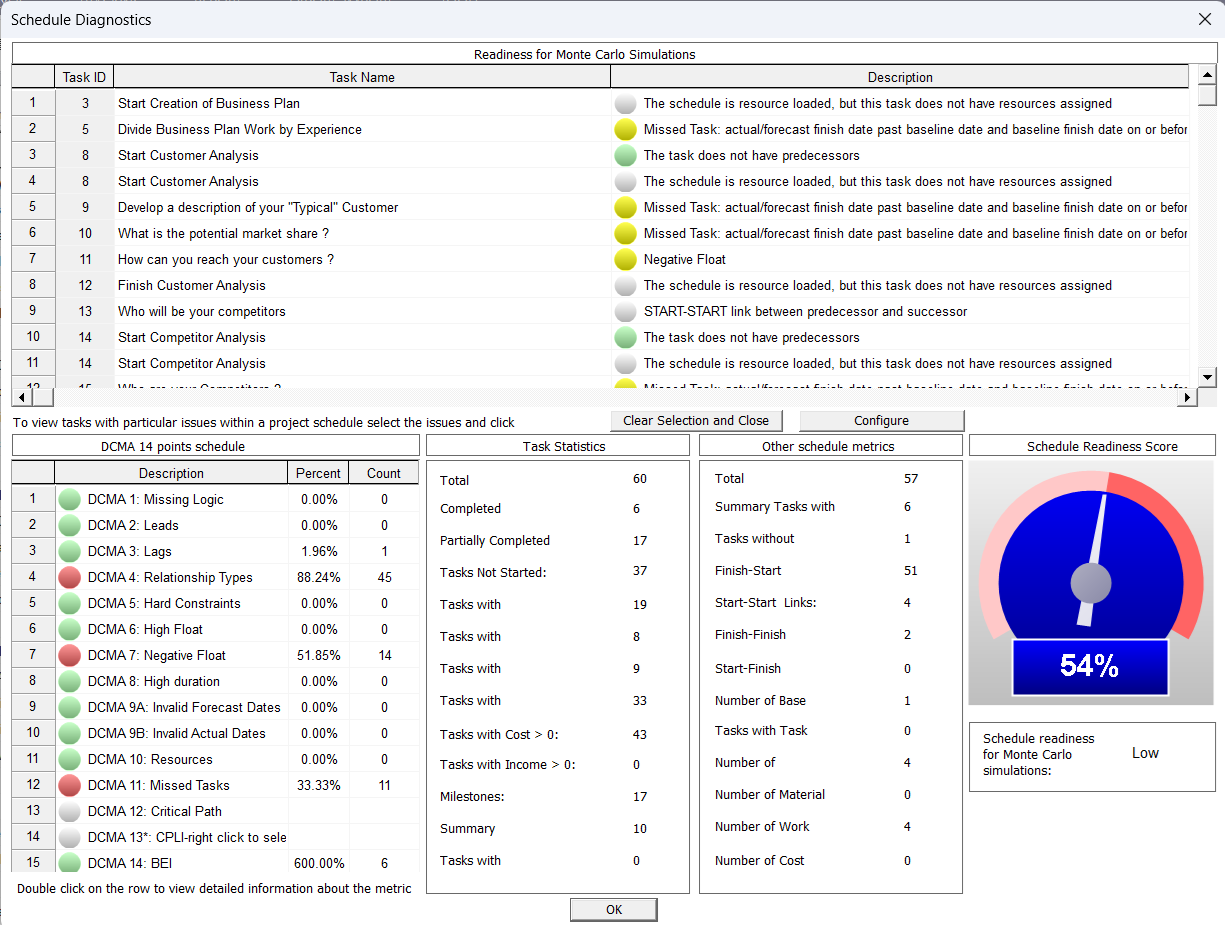
Schedule diagnostics is a critical step prior to project risk analysis. It helps identify issues in project schedules that can lead to misleading and erroneous analysis results. RiskyProject by Intaver Institute includes a built-in Schedule Diagnostics tool based on the DCMA 14-Point Assessment and 21 customizable health checks. It automatically audits project schedule logic, identifying missing links, hard constraints, and other anomalies prior to running Monte Carlo schedule risk analysis. Users can filter errors, view detailed rule descriptions, jump directly to flagged tasks in the Gantt View, and export audit reports to Microsoft Excel.
RiskyProject Schedule Diagnostics at a Glance
- DCMA 14-Point Assessment: Industry-standard audit of logic links, leads/lags, constraint types, high/negative float, and other anomalies in project schedules. It establishes a decision gate for baseline schedule quality.
- 21 Built-In Diagnostic Tests: Automated checks for missing predecessors/successors, excessive float, duration limits, and other anomalies. They are specifically designed for be ensure quality of project risk analysis with Monte Carlo simulations.
- Interactive Gantt Navigation: Double-clicking flagged tasks automatically navigates to that activity in the Gantt View. It accelerates schedule auditing and error remediation.
- Custom Rules & Thresholds: Fully configurable rule parameters, test toggles, and severity color coding. It adapts diagnostic standards to specific organizational risk postures.
- Schedule Readiness Score: A score presented using a meter in RiskyProject that indicates the quality of the project schedule. The score is calculated based on the results of the aforementioned tests.
- Native Integration: Built directly into the core RiskyProject simulation engine. It eliminates the need for external auditing software or manual spreadsheet macros.
What is Schedule Diagnostics in Project Risk Analysis?
In project management, schedules form the baseline network for quantitative duration uncertainty and risk modeling. However, project networks frequently contain structural flaws—such as unlinked tasks, rigid hard constraints, or unverified leads and lags. Running a valid schedule risk analysis requires a structurally sound, dynamic schedule. When quantitative Monte Carlo analysis is executed on an unhealthy schedule:
- Broken logic prevents delayed tasks from driving downstream work.
- Hard constraints fix task dates, obscuring true variance and confidence levels (e.g., P80 dates)
- Overall risk forecasts become distorted, producing unreliable contingency estimates.
Schedule diagnostics provides an automated, systematic audit to verify that schedule network logic is fully functional before running risk simulations.
RiskyProject Professional’s XER Import Settings let you explicitly specify ANSI, UTF-8, or UTF-16LE encoding before import, so activity names and notes come through cleanly regardless of language.
How to Run Schedule Diagnostics in RiskyProject (5-Step Workflow)
- Execute Diagnostics: Navigate to the Schedule tab in RiskyProject and click Schedule Diagnostics.
- Review Failed Tasks: Inspect the upper pane to review tasks failing compliance criteria, sorted by Task ID, Name, and unmet test rules.
- Analyze Summary Metrics: Check the lower-left pane for test lists and the lower-right pane for high-level schedule statistics.
- Filter & Inspect: Click any test to highlight affected tasks. Double-click a test to read its detailed criteria description.
- Remediate in Gantt View: Double-click any flagged task to close the diagnostic panel and jump directly to the activity in the Gantt View for instant correction.
Frequently Asked Questions
Does RiskyProject require a separate third-party plugin for schedule diagnostics?
No. Schedule diagnostics is natively integrated into RiskyProject Professional, Lite, and Enterprise on the main Schedule ribbon tab.
Can diagnostic audit rules be customized for specific project requirements?
Yes. Users can click Configure to enable or disable individual diagnostic tests, adjust threshold limits (such as max float or task duration), and customize status display colors.
Can diagnostic audit reports be exported to Microsoft Excel?
Yes. The complete schedule diagnostics results table can be copied and pasted directly into spreadsheets or reporting documentation.